Fallout Pip-Boy SE Watch Face
Facer StudiosPersonalization
4.7357.00 Reviews
- Version
- Varies With Device
- Installs
- 100.00K
- Age Rating
- Everyone
Screenshots

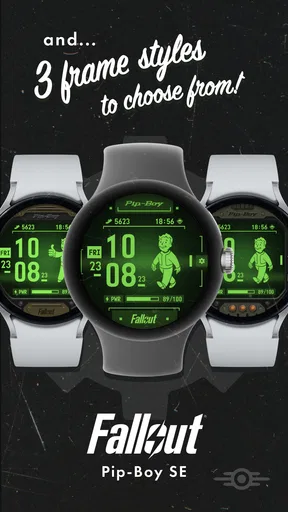
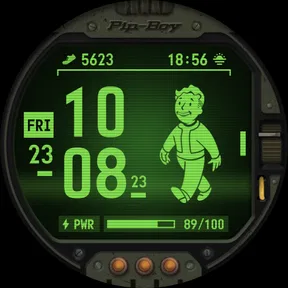
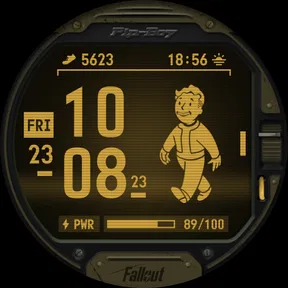
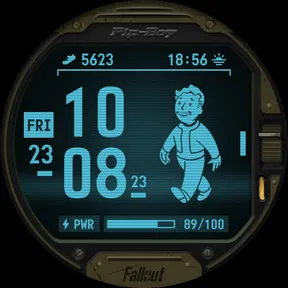
Our Review of Fallout Pip-Boy SE Watch Face
 Analysis by Appyee
When several people share a home, a smartwatch face can be a small personal choice that still gets noticed: someone asks what is on your wrist, and suddenly a familiar game-world design becomes part of the conversation. I see the Pip-Boy SE as best suited to that kind of lighthearted, individual use. It brings a distinctive Fallout-inspired look to a watch without turning the household into a gaming setup or asking everyone to use the same style.
That distinction matters if a watch is handed down, borrowed, or shared between family members. A watch face is a visual choice, not a household coordination tool. I would treat its setup as belonging to the person who uses the connected watch and companion app, rather than assuming that another person’s preferences or information will carry over neatly. If several people take turns with one device, agreeing who changes the face and when can avoid a small but familiar annoyance: one person’s personalized screen becoming another person’s surprise.
A personal display in a shared home
Picture a family member getting ready for the day while another person borrows the watch to check the time or steps. The Pip-Boy styling may prompt a smile, especially if Fallout is a shared interest, but it is still a personal interface rather than a shared calendar or family dashboard. I would choose it for the person who enjoys seeing the theme throughout the day, not as a way to coordinate everyone’s routines.
There is also a practical choice to make before setting it up: decide whether the wearer wants the display to be a conversation piece or a quick-glance tool. A dense, themed screen can be fun to show friends, while someone who mainly checks the time while carrying groceries or walking may prefer a calmer, more instantly readable face. That trade-off is worth considering before paying for a design whose appeal is strongly visual.
Keeping setup expectations realistic
The app is a personalization product from Facer Studios, and the face is intended for a compatible smartwatch rather than as a standalone phone experience. Before buying, I would check that the watch and its companion setup support the face. That small check is more useful than assuming that every watch using a familiar operating system handles every third-party face in the same way.
For a shared device, I would also keep account boundaries simple: let the regular wearer handle the purchase and setup, and avoid casually switching accounts just to let someone else try the look. This is not a claim that the app offers family profiles or special sharing controls; it is a sensible way to keep purchases and personalization tied to the person who is actually managing them. If a child borrows a parent’s watch, an adult can decide whether the theme is appropriate and whether the child should change any settings.
What the theme does—and what it cannot replace
The appeal here is specific: the Pip-Boy visual language makes an ordinary watch feel connected to Fallout. That is a different goal from choosing a face primarily for accessibility, a very clean time display, or a work-focused layout. Someone who wants the least distracting screen possible may be happier with a plain built-in option; someone who likes recognizable game-inspired design is more likely to find the extra personality worthwhile.
When several people use different watches, coordination does not need to be complicated. I would let each person choose a face that suits them rather than trying to make everyone’s screen match. If a household shares one watch, agreeing on a default face and asking before changing it is a low-effort courtesy. The design can be part of someone’s identity without becoming a family-wide decision.
It is also worth remembering that a watch face is only one layer of the wearable experience. The phone or watch still governs the practical details of notifications, health information, and access. I would not choose a Fallout design on the assumption that it changes those underlying functions, or that its themed appearance makes private information more or less private. For a household, the best approach is to review the watch’s ordinary account and notification settings separately.
Who is likely to enjoy it
I would recommend the Pip-Boy SE to a Fallout fan who likes recognizable details and wants their watch to feel less generic. It also makes sense for someone who enjoys rotating watch faces to match their mood, outfit, or a conversation with friends. The strongest use case is not a complicated one: wearing a bit of game-inspired design during an ordinary day and enjoying the occasional comment from someone who recognizes it.
I would skip it if the wearer is indifferent to Fallout, expects a broad collection of unrelated themes, or values a strictly minimal display above character. It is also not the right purchase for a household hoping to manage multiple people from one place. A watch face can personalize a screen, but it should not be mistaken for a shared-use or family-management app.
Price is another point to weigh. At $1.99, this is a paid personalization choice, so I would make the purchase because the Pip-Boy look itself appeals, not because I expect a bundle of household features. The Everyone age rating makes the app broadly age-appropriate as a store classification, but a parent should still decide whether a game-linked design suits a particular child and whether the child is using an adult’s device responsibly.
First Impressions: A Blast from the Past
Alright, folks, buckle up as we dive into the world of wrist adventures with the Fallout Pip-Boy SE Watch Face. If you’re a fan of the Fallout series or just love adding a bit of geeky charm to your smartwatch, then you’re in for a treat.
The moment I installed the Pip-Boy SE on my smartwatch, I felt like I’d strapped a tiny vault onto my wrist. The retro-futuristic aesthetics of the Pip-Boy interface are remarkably detailed. It’s like having your own personal piece of post-apocalyptic tech, minus the radiation, of course.
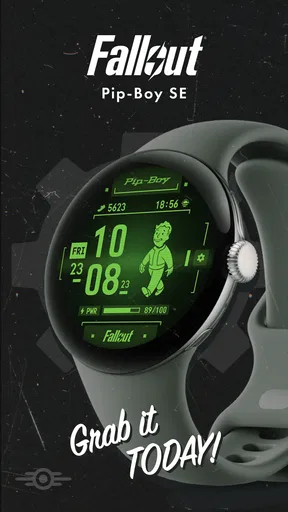
The watch face itself is a faithful recreation of the iconic Pip-Boy device from the Fallout universe. Everything from the green monochrome display to the blocky fonts screams vintage charm. It’s a real conversation starter, especially if you’re surrounded by fellow gamers or sci-fi enthusiasts.
Features: More than Just a Pretty Face
Now, let’s talk about what this watch face can actually do. It’s not just about looks; the developers have packed in quite a few functionalities. You can view the time, date, and even monitor your steps. It’s like having a mini personal assistant that also happens to look super cool.
One of my favorite features is the battery life indicator styled as an in-game power bar. It’s a neat touch that keeps things thematic and practical. Plus, the customizable options allow you to tweak various elements to suit your taste. Whether you prefer a minimal look or want all the data, the choice is yours.
That customization is particularly useful when the watch serves more than one purpose during the day. I would begin with only the information I genuinely check, then add other elements if the screen remains easy to scan. A themed face can tempt you to display everything at once, but a crowded wrist is less helpful when you only have a moment to glance down. For a wearer who shares the watch occasionally, a simpler arrangement may also be easier for someone else to understand.
For everyday use, think about when you tend to check the watch. If you glance at it while walking, carrying bags, or helping someone at home, readability matters more than showing every available detail. If you mostly look at it while sitting at a desk, the visual richness may be more enjoyable. I would treat these as a personal trade-off, not assume that one arrangement is right for every wearer.
Usability: Navigating the Wasteland
Installing and setting up the Pip-Boy SE is a breeze. Even if you’re not particularly tech-savvy, the interface is intuitive. The app provides a step-by-step guide to get you set up in no time. Once you’re up and running, accessing all its features is straightforward.
The watch face is designed to be power-efficient, so you won’t find yourself running to the nearest charger after a few hours of use. It’s optimized to blend style with functionality, ensuring your device lasts throughout your daily adventures.
In my view, the useful workflow is to set it up once, check that the information you care about is visible, and then leave the layout alone for a few ordinary days. That gives you a fair sense of whether the design works during errands, at work, and at home, rather than judging it only from the initial novelty. If you do share the watch, tell the next wearer what the display emphasizes and let them decide whether the same arrangement suits them.
The app sits in the personalization category, and its audience is fairly clear: people who want their smartwatch to express a particular interest. It has a 4.4 average from around three thousand ratings, with more than one hundred thousand installs. Those figures suggest that it has found an audience, but they are not a substitute for checking compatibility or deciding whether this particular theme fits your habits.
It was released on April 5, 2024, and the app is rated Everyone. I would read that age label as a general content classification, not as a promise that every watch setup is suitable for every child. In a household, parents still have the final say about account use, purchase approval, and what a child can access on a connected device.
The Verdict: A Must-Have for Fallout Fans
If you’re someone who cherishes the blend of gaming nostalgia and modern tech, the Fallout Pip-Boy SE Watch Face is a must-have. It’s more than just a watch face; it’s a conversation starter, a style statement, and a way to keep a part of the Fallout universe with you at all times.
Whether you're a hardcore fan of the series or just love the aesthetic, you'll find a lot to love here. So, go ahead and transform your smartwatch into a mini Pip-Boy. Trust me, it’s worth the trip to the wasteland.
Ready to bring a piece of the Fallout world to your wrist? Check out the download link on our website, and get ready to step into the future with a touch of the past.
A household-level decision, not a household tool
My recommendation is straightforward: buy it for the person who will wear and appreciate the Pip-Boy look, and keep shared-device expectations modest. In a home where everyone has a personal watch, each wearer can make their own choice. Where a watch is passed around, agree on who manages its face and account, and remember that another person may prefer a simpler display. That little bit of coordination protects the fun of the design without pretending it solves a broader family need.
If you are comparing it with the usual alternatives, the choice is between a distinctive licensed-game aesthetic and the flexibility of a generic face or a plainer built-in design. The latter may be easier for a mixed household or for someone who prioritizes immediate legibility; the Pip-Boy option wins when the Fallout identity is the point. I would not call either approach universally better. The right pick depends on whether the wearer wants personality on the wrist or the most neutral screen possible.
Before spending the $1.99, I would answer three practical questions: does the connected watch support it, will the intended wearer enjoy this specific Fallout styling after the novelty settles, and is that person the one who should manage the purchase and setup? If the answers are yes, the app makes sense as a focused personal treat. If not, a free standard face or a more neutral option is the safer choice for a shared device.
Overall, I like the Pip-Boy SE most when it is treated as a small, expressive accessory rather than a productivity upgrade. Its strongest value is how clearly it gives a smartwatch a Fallout identity, while the main limitation is that this specialized appeal will not suit everyone in a household. For a fan who wants that look on their wrist, I can see the purchase being satisfying; for someone seeking a universal family display, I would look elsewhere.
Verdict
Strengths of Fallout Pip-Boy SE Watch Face
- Authentic Fallout design adds nostalgia.
- Customizable widgets for personalization.
- Battery-friendly, doesn't drain quickly.
- Smooth performance without glitches.
- Easy to install and set up.
Limitations of Fallout Pip-Boy SE Watch Face
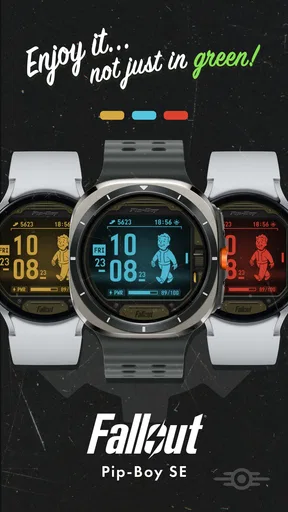
- Limited color options for customization.
- No interactive features beyond display.
- Requires constant app updates.
- May not fit all watch sizes well.
- Some features need premium upgrade.
Other Releases by Facer Studios
View All
Facer Watch Faces
Personalization4.4

Star Trek LCARS SE Watch Face
Personalization4.4

ULTRA Digital Retro watch face
Personalization4.5
Similar Picks in This Category
View All
Microsoft SwiftKey AI Keyboard
SwiftKey4.3

Wallpapers
Google LLC4.1

Zedge™ Wallpapers & Ringtones
Zedge4.7

Yandex Browser with Alice AI
Direct Cursus Computer Systems Trading LLC4.3

Ringtone Maker:create ringtone
Big Bang Inc.4.7

Fonts Keyboard
Fonts Keyboard3.9
Frequently Asked Questions
What is Fallout Pip-Boy SE Watch Face and how does it work?
Fallout Pip-Boy SE Watch Face is a smartwatch application designed to mimic the iconic Pip-Boy interface from the Fallout game series. It offers a nostalgic look by transforming your watch face into a digital replica of the Pip-Boy. Users can customize the display to show different metrics like time, steps, and battery life, making it both functional and visually appealing.
Is the Fallout Pip-Boy SE Watch Face compatible with all smartwatches?
The Fallout Pip-Boy SE Watch Face is primarily designed for Android Wear OS and select iOS devices. Before downloading, ensure your smartwatch is compatible with these operating systems. Compatibility can also depend on the device’s screen resolution and version, so checking your watch’s specifications is recommended.
Does the app consume a lot of battery power?
While the Fallout Pip-Boy SE Watch Face is designed to be efficient, its detailed graphics and animations may consume more battery compared to simpler watch faces. Users have reported varying battery usage based on settings and screen brightness. Adjusting these settings can help optimize battery life while using the app.
Can I customize the display settings on the Fallout Pip-Boy SE Watch Face?
Yes, the Fallout Pip-Boy SE Watch Face offers several customization options. You can adjust colors, change the displayed metrics, and even choose different Pip-Boy styles. This flexibility allows users to tailor the watch face to their personal preference, enhancing both functionality and aesthetics.
Are there any in-app purchases or ads in the Fallout Pip-Boy SE Watch Face?
The Fallout Pip-Boy SE Watch Face may offer a premium version with additional features or customization options. While the basic version may be free, some functions might require in-app purchases. Fortunately, the app does not include intrusive ads, ensuring a clean and immersive user experience.
